# Email a PDF statement to every customer or member from SQL | DRE
> One run makes a branded PDF per member from SQL and emails each one only their own statement, held for review and sent at a rate the mail server accepts.
[← All use cases](https://getdre.com/use-cases/)
# A PDF statement for every member
A fund sends 400 members their monthly statement: a branded PDF each, emailed to each member with only their own statement attached. Nothing may go out before someone has checked it, and the mail server shouldn’t get 400 emails in one second.
Recorded from a real run: 400 statements made and held, then released to the test inbox with a live progress bar.
Recorded from a real run: 400 statements made and held, then released to the test inbox with a live progress bar.
## What it produces
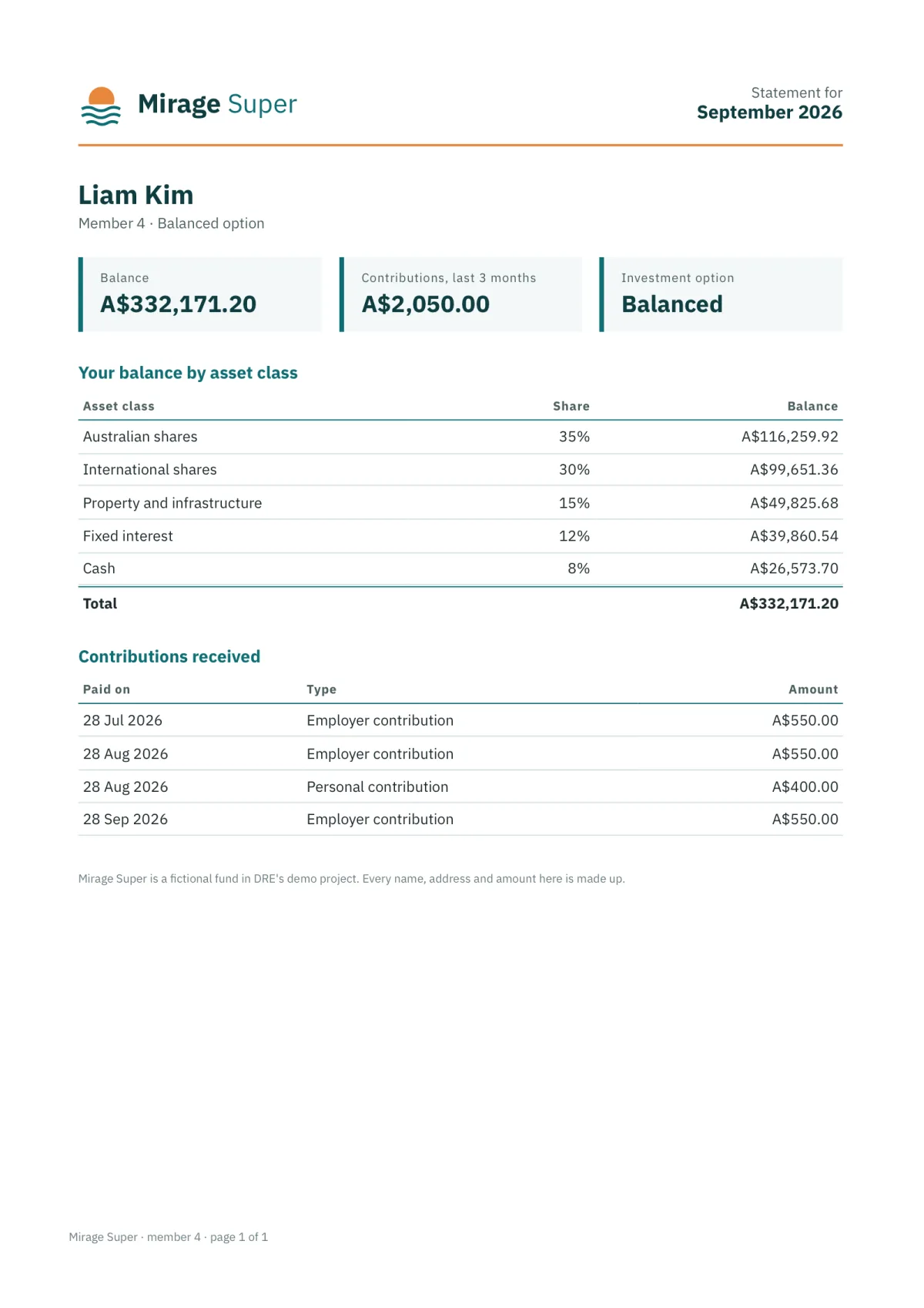
One member’s statement (Mirage Super is a fictional fund; every name and amount is made up).
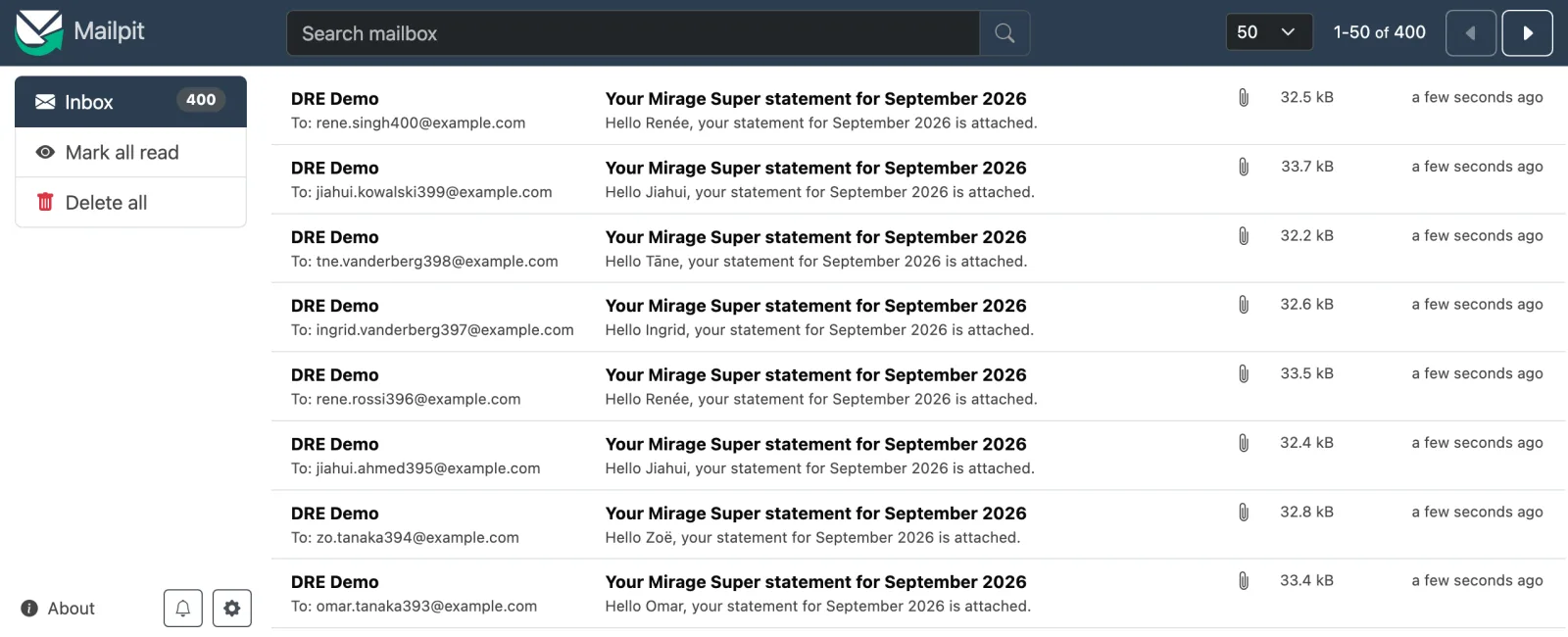
The test inbox (Mailpit): one email per member, each with only their own PDF.
[↓ Download one member’s statement (PDF)](https://getdre.com/media/downloads/mirage_super-4.pdf)
## How it’s built
The report’s SQL and YAML, as they sit in the project, and the commands that run it.
reports/mirage\_super/mirage\_super.yml
```yaml
queries: [ms_members, ms_balances, ms_contributions]
output:
- name: statement
format: pdf
template: {file: statement.html}
author: Mirage Super
for_each: {query: ms_members, key: member_id, concurrency: 4}
destination: {profile: local, path: "out/mirage_super/{{ run.date.format('%Y%m') }}/{{ each.member_id }}.pdf"}
- name: email
format: message
for_each: {query: ms_members, key: member_id}
title: "Your Mirage Super statement for {{ period('last_month').start.format('%B %Y') }}"
text: "Hello {{ each.first_name }}, your statement for {{ period('last_month').start.format('%B %Y') }} is attached."
destination:
- {profile: mail_local, to: "{{ each.email }}", attach: statement, hold: true, rate: 50/second, burst: 10}
```
reports/mirage\_super/ms\_members.sql
```sql
-- One row per member: the population, and each member's own values (each.*).
select customer_id as member_id,
full_name,
split_part(full_name, ' ', 1) as first_name,
email,
case customer_id % 3 when 0 then 'Growth' when 1 then 'Balanced' else 'Conservative' end as investment_option
from customers
order by customer_id
```
reports/mirage\_super/statement.html (excerpt)
```html
{{ each.full_name }}
Member {{ each.member_id }} · {{ each.investment_option }} option
...
{% for r in results.ms_balances.rows %}
| {{ r.asset_class }} | {{ (r.balance / total.v) | percent(0) if total.v else '' }} | {{ r.balance | currency('AUD', 2) }} |
{% endfor %}
```
terminal
```bash
dre run mirage_super # 400 PDFs, 400 emails held
dre run mirage_super --preview # or first: three members, nothing sent
dre release mirage_super --run --by checker
```
## What to notice
- The queries run once; each member’s PDF and email get only their rows.
- hold: true keeps every email in the run folder until someone runs dre release, which sends exactly what was rendered.
- rate: 50/second spaces the sends evenly; --rate on run or release overrides it, and a progress bar shows the real speed and the time left.
- A row that fails doesn’t stop the others: --retry-failed redoes only the failed members, from the saved results.
- Addresses are masked in the console, logs and run results.
- Since DRE 0.7, password: on the pdf output can lock each statement with the member’s own password (AES-256), and secret\_columns keeps those passwords out of logs and results.
## In the docs
- [Per-row outputs →](https://getdre.com/docs/per-row-outputs/)
- [Password-protected PDFs and zip packs →](https://getdre.com/docs/password-protected-outputs/)
- [PDF and HTML documents →](https://getdre.com/docs/plugin-document/)
- [Held deliveries and dre release →](https://getdre.com/docs/per-row-outputs/#held-deliveries-and-dre-release)
## More use cases
[
### DRE as a Databricks job
Install DRE from a wheel in a serverless job and write the report to a Volume.
](https://getdre.com/use-cases/databricks-job/)[
### One workbook from three systems
DuckDB, Postgres and Databricks tabs in one Excel file, each query on its own connection.
](https://getdre.com/use-cases/one-workbook-three-systems/)[
### A report built by a coding agent
From “help me with dre” to a delivered file, with an agent as the guide.
](https://getdre.com/use-cases/built-by-a-coding-agent/)