

← All use cases
Monthly finance pack
Finance wants the same workbook every month: detail and summary tabs, formatted revenue, commission formulas and a branded presentation. One report writes both workbooks from the same SQL.
What it produces
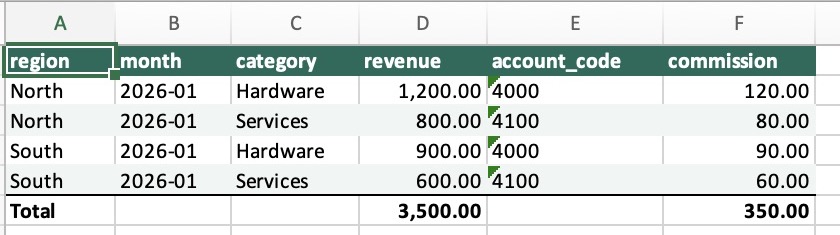
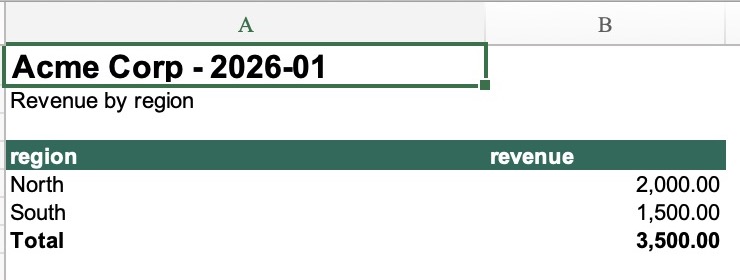
↓ Download the detail workbook (xlsx)
How it’s built
The report’s SQL and YAML, as they sit in the project, and the commands that run it. A complete, runnable version is in the public examples (linked above).
name: monthly_finance
default_profile: sample
vars:
month: '2026-01'description: Monthly finance pack, as a styled workbook and a filled Excel template.
# Variables this report takes: `dre run finance --var month=2026-02`.
var_schema:
month:
type: string
description: The month to report, YYYY-MM.
required: true
pattern: '\d{4}-\d{2}'
max_length: 7
top_regions: {type: integer, default: 10, description: Most regions to show.}
commission_rate: {type: number, default: 0.1, description: Commission as a fraction of revenue.}
include_services: {type: boolean, default: true}
close_date: {type: date, default: '2026-02-03'}
regions: {type: array, default: [North, South]}
thresholds: {type: object, default: {warn: 0.9, fail: 0.5}}
vars:
commission_rate: 0.1
timezone: America/New_York
locale: en-US
queries:
- {query: setup, tab: false}
- query: summary
tab_name: Summary
columns:
revenue: {format: "#,##0.00"}
style: {align: right, border: medium, borders: medium, bold: true}
- query: detail
data_tests:
- nonnegative: {arguments: {column: revenue}}
# Account mappings must not drop revenue from the styled detail sheet.
- reconcile_revenue:
query_results: {expected: summary}
arguments: {tolerance: 0.01}
tab_name: Detail
columns:
revenue: {format: "#,##0.00"}
commission:
formula: "=ROUND({revenue}*0.1,2)"
format: "#,##0.00"
total: sum
style: {italic: true, font_color: "#555555"}
style: {align: left, border: thin, borders: thin}
- query: targets
tab_name: Targets
columns:
target: {format: "#,##0.00"}
revenue: {format: "#,##0.00"}
commission: {format: "#,##0.00"}
# Every key of a tab's look: font, header and totals rows, banding and borders, and the
# data cells' own keys.
style:
font: {name: Arial, size: 10}
header: {fill: "#176B59", font_color: "#FFFFFF", bold: true}
totals: {bold: true, border: thin}
banded_rows: "#F0F5F3"
borders: none
bold: false
italic: false
underline: false
font_color: "#222222"
fill: "#FFFFFF"
align: center
border: none
# Starts at B3, with no header row.
- {query: calendar, tab_name: Calendar, anchor: B3, header: false, autofit: false}
# Normally empty: its tab is left out rather than written empty.
- {query: exceptions, tab_name: Exceptions, on_empty: skip}
- month_total
output:
- name: finance
format: xlsx
queries: [detail, summary, targets, calendar, exceptions]
header: true
autofit: true
totals_label: Total
max_rows_per_sheet: 100000
date_format: "dd/mm/yyyy"
datetime_format: "dd/mm/yyyy hh:mm"
time_format: "hh:mm"
columns:
revenue: {total: sum}
style:
header: {fill: "#176B59", font_color: "#FFFFFF"}
banded_rows: "#F0F5F3"
destination: {profile: local, path: "out/finance-{{ var('month') }}.xlsx"}
- name: presentation
format: xlsx
queries: [summary, month_total]
# The month's revenue is always there: an empty pack is an error.
on_empty: fail
template:
file: templates/finance.xlsx
bindings:
- {sheet: Summary, cell: A1, value: "Acme Corp - {{ var('month') }}"}
- {sheet: Summary, cell: B2, query: month_total, column: revenue}
- {sheet: Summary, query: summary, result_index: 1, anchor: A4, header: true, columns: [region, revenue]}
destination: {profile: local, path: "out/presentation-{{ var('month') }}.xlsx"}select s.*, a.account_code, revenue * 0.1 as commission
from {{ source('finance', 'sales') }} s
join {{ ref('accounts') }} a using (category)
where month = '{{ var("month") }}'
order by region, category;dre run --var month=2026-01