

You are not the report mailroom.
DRE is an open-source reporting engine. It turns every recurring report into SQL, Jinja and YAML in git, then builds the Excel pack, the bank file, a PDF for every member or the Slack number and delivers it on schedule. From your stack, without you.
pip install dre-cli
brew install get-dre/tap/dre
# Claude Code
claude plugin marketplace add get-dre/dre
claude plugin install dre@dre
# Other agents
npx skills add get-dre/dre#skills-latest
curl -fsSL https://getdre.com/install.sh | sh
scoop bucket add get-dre https://github.com/get-dre/scoop-bucket
scoop install get-dre/dre
Moving SAS reports? Keep your database. Explore the example. Released
Open source, GPL-3.0 · Runs on your infrastructure · Works with your scheduler
Can you resend last month’s pack?
FinanceThe bank needs the payments file by six.
TreasurySame report, but one per client?
Sales ops
reports/finance/finance.yml
output:
  format: xlsx
  destination:
    profile: mail_local
    to: finance@example.com
reports/payments/payments.yml
output:
  format: fixed_width
  extension: dat
  destination:
    profile: sftp_password
    path: /upload/payments.dat
reports/msg_daily/msg_daily.yml
output:
  - name: headline
    format: message
    destination:
      - {profile: slack,
         attach: [workbook]}
reports/statements/statements.yml
output:
  format: xlsx
  destination:
    profile: mail_local
    to: "{{ var('recipient') }}"
sets: [client_a, client_b]
reports/mirage_super/mirage_super.yml
output:
  - name: statement
    format: pdf
    for_each: {query: ms_members, key: member_id}
  - name: email
    format: message
    for_each: {query: ms_members, key: member_id}
    destination:
      - {profile: mail_local, to: "{{ each.email }}",
         attach: statement, hold: true}
reports/extracts/extracts.yml
output:
  format: parquet
  destination:
    profile: s3_keys
    path: s3://…/regions.parquet
reports/lakehouse/lakehouse.yml
output:
  format: xlsx
  destination:
    profile: databricks_oauth
path: /Volumes/…/pack.xlsxMove your SAS reporting workflows to DRE. Keep your database.
A synthetic overdue-loan pack, from source inputs to checked Excel outputs. Oracle and SQL Server SQL. A generated workbook and an Excel-authored template. Released with DRE 0.10.0.
One report definition, database SQL and two checked Excel workbook approaches. Watch the real run and inspect the code.
Return the old mailroom to sender.
Recurring reports quietly turn data engineers into couriers. DRE takes the courier work and leaves you the definitions.
send_finance_v3_FINAL.pyA script per report, openpyxl formatting by hand.
A report is SQL for the data and YAML for the tabs, formats, totals and template.
cron on someone’s VMNobody knows it runs until it doesn’t.
dre run from the scheduler you already have: cron, Airflow, Dagster or Databricks Jobs.
“Who changed this number?”Logic lives in a workbook or a laptop.
Every change is a reviewed commit, with history, blame and a way back.
Copy, paste, attach, sendThe last mile is a person.
Email, Slack, SFTP, S3, GCS, Azure Blob and Databricks Volumes are declared in YAML.
Open any slot. Read the code behind it.
The definition on the left, what the recipient gets on the right. Real configuration from DRE’s tested examples.
output:
  - name: finance
    format: xlsx
    columns:
      revenue: {total: sum}
    style:
      header: {fill: "#176B59", font_color: "#FFFFFF"}
      banded_rows: "#F0F5F3"
    destination: {profile: local, path: "out/finance-{{ var('month') }}.xlsx"}
Inspect the SQL and full configuration
select s.*, a.account_code, revenue * 0.1 as commission
from {{ source('finance', 'sales') }} s
join {{ ref('accounts') }} a using (category)
where month = '{{ var("month") }}'
order by region, category;queries:
- {query: setup, tab: false}
- query: detail
tab_name: Detail
columns:
revenue: {format: "#,##0.00"}
commission: {formula: "=ROUND({revenue}*0.1,2)", format: "#,##0.00", total: sum}
- query: summary
tab_name: Summary
columns:
revenue: {format: "#,##0.00"}
output:
- name: finance
format: xlsx
columns:
revenue: {total: sum}
style:
header: {fill: "#176B59", font_color: "#FFFFFF"}
banded_rows: "#F0F5F3"
destination: {profile: local, path: "out/finance-{{ var('month') }}.xlsx"}
- name: presentation
format: xlsx
queries: [summary]
template:
file: templates/finance.xlsx
bindings:
- {sheet: Summary, cell: A1, value: "Acme Corp - {{ var('month') }}"}
- {sheet: Summary, query: summary, anchor: A4, header: true}
destination: {profile: local, path: "out/presentation-{{ var('month') }}.xlsx"}| Region | Revenue |
|---|---|
| North | 2,000.00 |
| South | 1,500.00 |
| Total | 3,500.00 |
Illustrative preview using the tested finance demo’s data. Download the actual workbook below.
queries: [msg_headline, msg_regions]
output:
  - name: workbook
    format: xlsx
    queries: [msg_regions]
    destination: {profile: local, path: "out/messages/regions-{{ run.date.yyyymmdd }}.xlsx"}
  - name: headline
    format: message
    title: "{{ var('company') }}: {{ period(var('period')).start.format('%B %Y') }}"
    text: |
      Net revenue: **{{ results.msg_headline.first.net | currency('EUR') }}** ({{ results.msg_headline.first.change | percent | signed }} on the month before)
      Orders: {{ results.msg_headline.first.orders | number }}
      Top regions:
      {% for r in results.msg_regions.rows[:3] %}- {{ r.region_name }}: {{ r.net | currency('EUR') }}
      {% endfor %}
    destination:
      - {profile: slack, attach: [workbook]}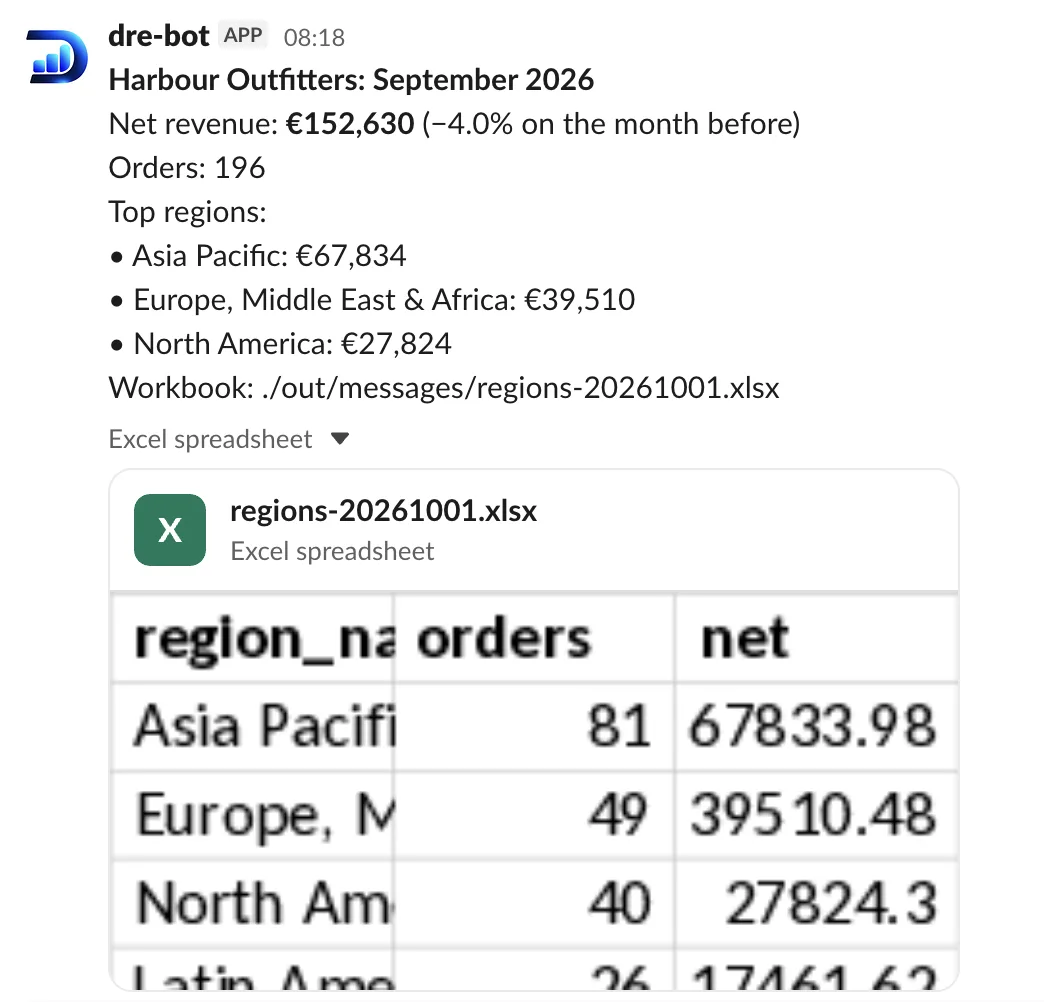
Real Slack output from the daily headline demo. The message and workbook use the same query results.
queries: [payment_lines]
output:
  format: fixed_width
  extension: dat
  header: true
  line_ending: "\n"
  columns:
    - {name: order_id, width: 10, align: right, pad: "0", header: ORDER}
    - {name: order_date, width: 8, date_format: "%Y%m%d", header: DATE}
    - {name: sku, width: 8, truncate: true, header: SKU}
    - {name: qty, width: 4, header: QTY}
    - {name: unit_price, picture: "9(6)V99", header: PRICE}
    - {name: net_amount, width: 12, align: right, pad: "0", decimals: 2, decimal_point: implied, sign: trailing, header: NET}
    - {name: discount_pct, width: 3, align: right, pad: "0", null_fill: " ", header: DSC}
  destination:
    profile: sftp_password
path: "/upload/payments-{{ run.date.yyyymmdd }}.dat"ORDER DATE SKU QTY PRICE NET DSC 000010000120250101SKU-10561 0002799900000023799+015 000010000120250101SKU-10283 0001199500000032387+010 000010000220250101SKU-11122 0000590000000011800+ 000010000220250101SKU-10843 0001290000000038700+ 000010000220250101SKU-10633 0000499500000014985+ 000010000320250101SKU-10701 0000990000000009405+005
Exact columns. Ready for SFTP.
Download the actual fileAn excerpt from the actual fixed-width file generated by the bank delivery demo. Column widths, padding and delivery are declared in YAML.
One command does the rounds.
Define the report
SQL selects the data. YAML describes the tabs, columns, formulas, templates and destinations. Review them together.
Run it from your stack
dre run builds and delivers. Call it from cron, Airflow, Dagster, Databricks Jobs or any orchestrator.
Repeat without rewriting
Variables for the period, sets for each client or region, machine-readable results for automation.
Built your tables with dbt?
dbt transforms data in the warehouse. DRE turns it into the files and messages people receive, with familiar SQL, Jinja and YAML, reusable macros, ref() and git habits.
Inspect the code and the runDownload one member’s statement (PDF)
400 statements. Not one sent unchecked.
One run builds a branded PDF for every member, from an HTML template, and an email that carries only that member’s statement. Then it holds them. A checker looks over the run and releases it, and DRE sends exactly what was rendered, at a pace your mail server can take.
for_eachOne PDF and one email per row. The queries run once; each member gets only their own rows.hold: trueNothing leaves the run folder until someone runsdre release.--previewrenders three members first and sends nothing.rate: 50/secondSends are spaced evenly, with a live progress bar. A failed row doesn’t stop the rest, and--retry-failedredoes only those.
Mirage Super is a fictional fund: every name and amount is made up.
Any warehouse in. Any inbox out.
Sources, formats and destinations are independent plugins. One report can read several sources and deliver to several places in one run.
Read from
- ClickHouse
- Databricks
- DuckDB
- JDBC
- PostgreSQL
- BigQueryalpha
- Snowflakealpha
Build as
- CSV
- Delimited text
- HTML
- Fixed-width
- Parquet
- Excel
- Headline messages
Deliver to
- Databricks Volumes
- FTP / FTPS
- Amazon S3
- Google Cloud Storage
- Azure Blob
- SFTP
- Slack
- Google Chatpreview
- Microsoft Teamspreview
- Local files
Let an agent write the report. Review it like code.
Reports are plain text, so coding agents can help. DRE’s skills take an agent from “help me with dre” to a delivered report, one question at a time, and the SQL and YAML stay in your project.
npx skills add get-dre/dre#skills-latestGive AI answers you can trace MCP · RC preview
DRE MCP is a separate companion. It brings reviewed reports and documented tables to AI, and marks what is verified, derived or exploratory.
Read the MCP documentationRequest access
MCP has its own early-access licence. DRE core stays open source.
Know what you’re adopting.
DRE is under active development, before 1.0. Check its capabilities and limits before it joins your stack.
What is DRE?
DRE (Declarative Reporting Engine) is a free, open-source command-line tool for reports as code. You write each report as SQL, Jinja and YAML files in git; DRE runs the SQL against your database, builds the file (an Excel workbook, CSV, fixed-width, Parquet, HTML or PDF) or a headline message, and delivers it by email, SFTP, cloud storage or Slack. What reports as code means.
Does DRE replace dbt?
No. dbt transforms data inside your warehouse and builds tables. DRE starts where dbt ends: it reads those tables and turns them into the files people and systems receive. Many teams will use both.
Does DRE replace my BI tool?
No. Dashboards stay in your BI tool. DRE is for recurring reports and files that have to arrive somewhere in an exact shape: a monthly finance workbook, a fixed-width file for a bank, an extract for another system. How DRE compares with the usual ways.
Does DRE schedule reports?
DRE is not a scheduler: it runs from the one you already have, such as cron, Airflow, Dagster, Databricks Jobs or GitHub Actions. You can name schedules in YAML so the orchestrator only says which one to run, and dre schedule ls shows every upcoming run.
Is DRE free?
Yes. DRE is open source under GPL-3.0, free for any use, commercial use included. A commercial licence is only needed to embed DRE in a product you distribute without the GPL’s obligations. Licensing FAQ.
What is DRE MCP?
DRE MCP is a separate companion in release-candidate preview. It brings reviewed reports and documented tables to AI, distinguishing verified report outputs, derived answers from saved results, and unverified exploratory queries with SQL to review. Access is available by request, under its own early-access EULA; DRE core remains open source under GPL-3.0. MCP demo and licensing details.
Close the mailroom.
DRE core is free and open source under GPL-3.0. Run it on your infrastructure, keep the definitions in git.
Licensing and commercial usepip install dre-cli
brew install get-dre/tap/dre
# Claude Code
claude plugin marketplace add get-dre/dre
claude plugin install dre@dre
# Other agents
npx skills add get-dre/dre#skills-latest
curl -fsSL https://getdre.com/install.sh | sh
scoop bucket add get-dre https://github.com/get-dre/scoop-bucket
scoop install get-dre/dre
Python · macOS · Linux · Windows · All installation methods