

← All use cases
Fill a branded Excel template
Finance has a monthly pack in the company’s look, with logos, colours, charts and formulas. Keep that workbook as a template and tell DRE where each query’s data goes. DRE writes the numbers and keeps the styling, extends the template’s totals over the new rows, and fills its row formulas down.
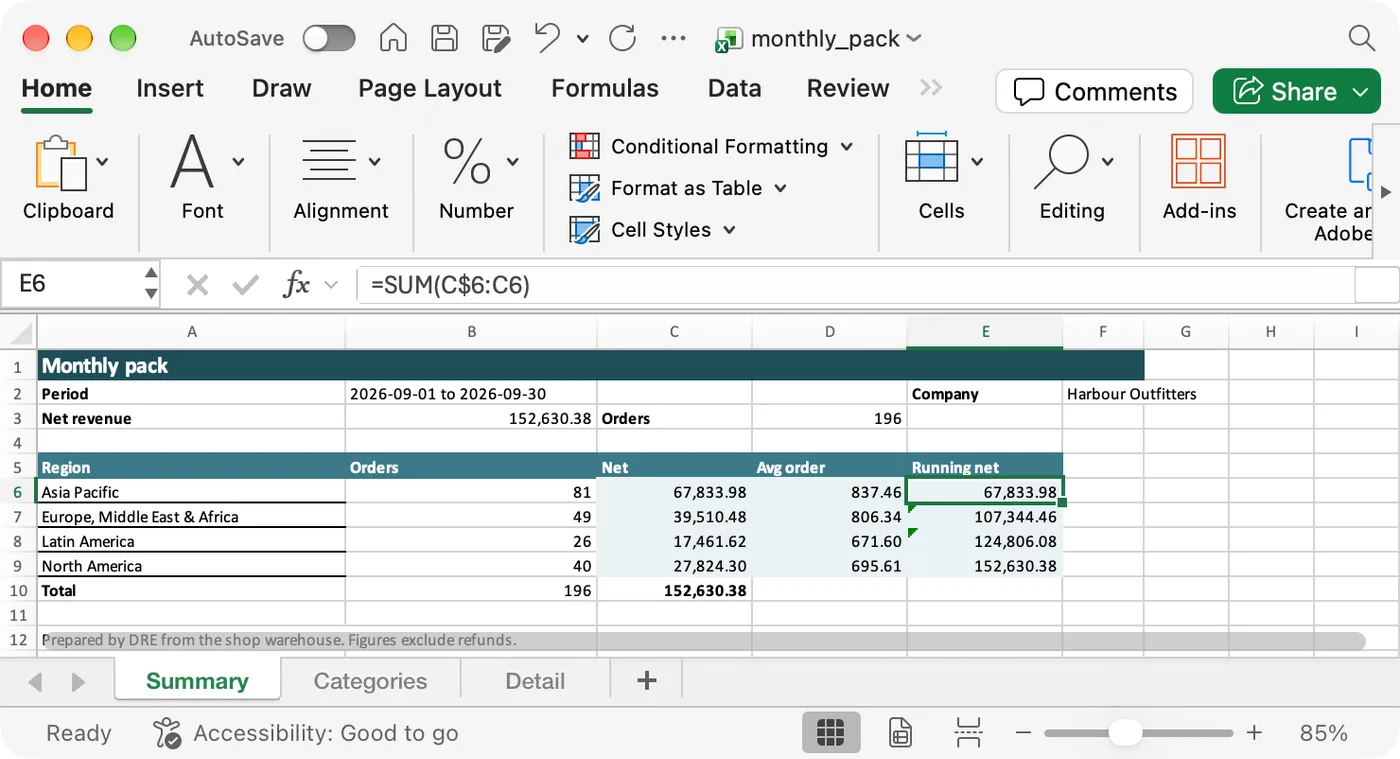
↓ Download the filled workbook (monthly_pack.xlsx)
queries:
  - {query: pack_kpis}
  - {query: pack_regions}
  - {query: pack_categories}
  - {query: pack_detail, tab_name: Detail}   # not bound: becomes a plain sheet after the template's own
output:
  format: xlsx
  template:
    file: monthly_pack.xlsx          # found in templates/
    bindings:
      - {sheet: Summary, cell: B2, value: "{{ period(var('period')).start.date }} to {{ period(var('period')).end.date }}"}
      - {sheet: Summary, cell: B3, query: pack_kpis, column: total_net}
      - {sheet: Summary, cell: D3, query: pack_kpis, column: orders}
      - {sheet: Summary, cell: F2, value: "{{ var('company') }}"}
      - {sheet: Summary, query: pack_regions, anchor: A6, header: false, columns: [region_name, orders, net]}
      - {sheet: Categories, query: pack_categories, anchor: A3}
destination: {profile: local, path: "out/monthly_pack.xlsx"}{% set p = period(var('period')) %}
select sum(net_amount) as total_net, count(distinct order_id) as orders
from {{ ref('paid_order_facts') }}
where order_date between '{{ p.start.date }}' and '{{ p.end.date }}'dre run xlsx_template --var period=last_month